CNESST calculations (formerly CSST)
For pay runs in tax year 2015 or later, you can have the system automatically calculate your company contribution to CNESST/CSST (Commission de la santé et de la sécurité du travail).
First, make sure your company is registered with the CNESST if you are based in Québec or have Québec-based employees. An employer must register within 14 days of hiring the first employee. You must also supply, within 60 days, the necessary information about the nature of the activities and the wages you expect to pay during the year. This information is used to determine the annual premium the company must pay.
You can register with the CNESST online or by telephone: 1-866-302-CSST (2778).
Once you know your CNESST premium rate, you can enter that detail in your payroll account.
Enabling CNESST
Step 1. Go to Settings.
Step 2. Click Pay Rules.
Step 3. Select Company Rules.
Step 4. Click Enable.
Step 5. Enter the CNESST Details as noted below.
Note: your company rate may be different than what is shown here.
Step 6. Click Save.
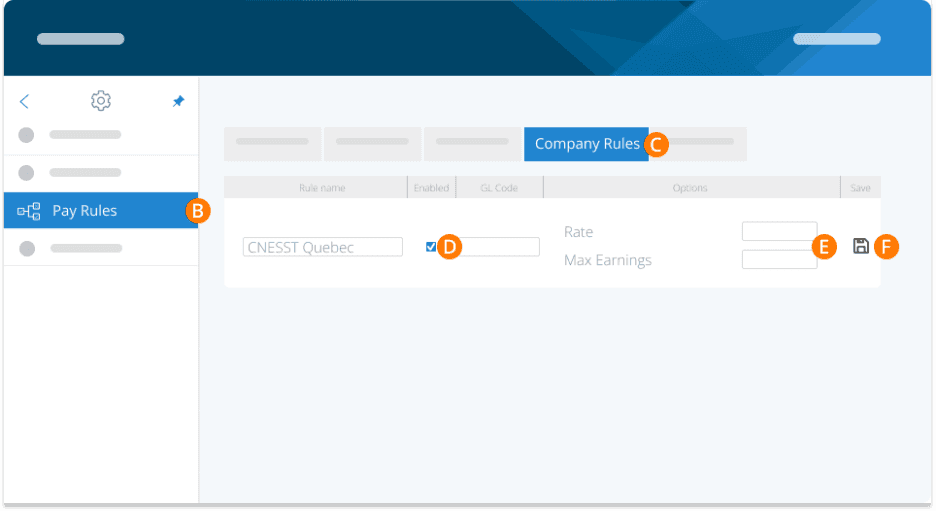
Future pay runs will now calculate CNESST for you.
Important Notes
CNESST can only be enabled for Québec-based businesses in the system. If your company is based in another province, you'll see the option to turn on other provincial programs (for example, EHT in Ontario). If you use ePay and have elected to make your remittance payments electronically then the CNESST portion will be remitted for you. You do not need to file this separately.
We recommend using a unique general ledger code for your CNESST rule so you can track these payments in your reports.
Company owners can be CNESST exempt. To set this properly go to EMPLOYEES> PROFILE>PAYROLL >TAX RULES. Change the field for WCB Exempt to Yes and your earnings will not be subject to CNESST.
Troubleshooting & FAQs
What if I forgot to enable this before my first pay run?
If you did not enable this prior to your first pay run and needed to have it calculated, you have 2 options. You can (1) calculate it manually and remit it manually, or (2) reverse the pay run and re-do it now that CNESST is enabled.
If I have the auto-remittance service enabled, will PayEvo remit on my behalf?
Yes, if PayEvo remits on your behalf and you have enabled this rule, it will be included in the amount we will remit to MRQ.
Keywords: Quebec Taxes, CNESST, CSST
396
Can't find what you are looking for? We can take a more direct look to help resolve your matter — Create Case or Contact Us