Terminating the Employee
If you are looking to issue a top-up to an employee on parental leave, follow the steps below.
1. Terminate the employee and issue an ROE so they can apply for their regular EI benefits for Maternity/Parental leave. If you need help with this, see our article here.
2. Rehire the employee with a new start date. The rehire date can be the first day of the next pay cycle that you wish to provide the top up in, or any other date you choose.
To rehire go to Employees > Change ‘Team’ to ‘Off-Boarding’ and click the three dots and select Rehire.
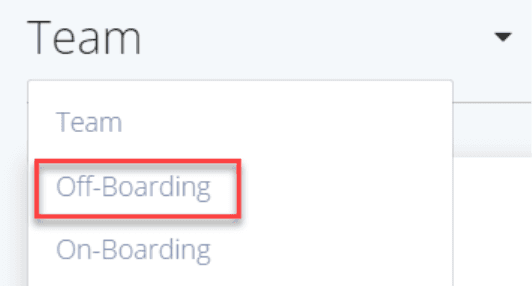
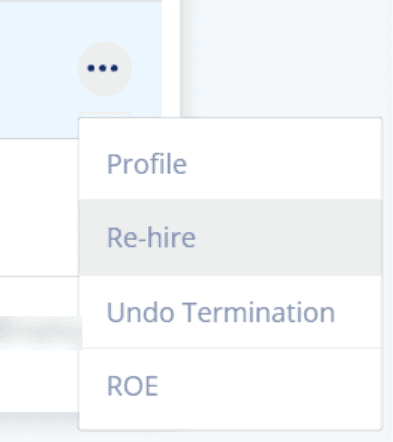
Please Note: If you terminated your employee in a previous year and will rehire them in a new calendar year, you will need to update the employee’s TD1 values. To do this, open the employee’s Profile, select the Payroll tab and manually enter the correct values under Tax Rules. Click Save.
Paying out the Top-Up
1. First you need to create a new earning to pay this out. Go to Settings > Pay Rules.
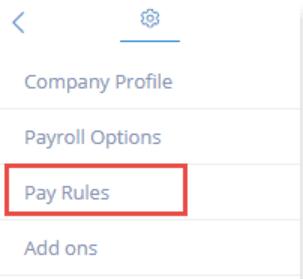
2. Click on the EARNINGS tab and add a custom rule. The (+ ADD NEW RULE) button on the right side of your screen.
3. Name your rule something like ‘Parental Leave’ so that the information is easy to read and locate.
4. Enable the rule and generally set it to CPP, Fed and Prov Taxes. If your top up is paid under an approved Supplemental Unemployment Benefit Plan (SUB) then do not check the box for EI. If it is not paid under an SUB then do check the box for EI. Please confirm with your accountant or the CRA that these settings are correct.
5. If your employee is eligible to earn vacation on this amount please set it be “vacationable”. Click Save.
See the example below:
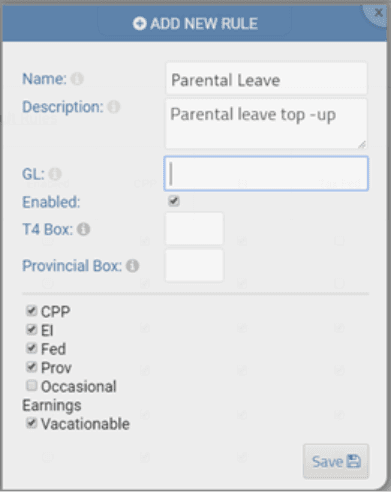
The custom rule should now appear in your Earnings Rules list.

6. Run Payroll. When you run payroll, you will not be selecting regular hours for this particular employee. Instead, select this custom earnings rule and enter the total amount to be paid out with each pay. Finish as normal.
Keywords: Maternity Leave, Paternity Leave, Parental Leave, Top-up
396
Can't find what you are looking for? We can take a more direct look to help resolve your matter — Create Case or Contact Us