If you process a payroll for an amount that exceeds the maximum limit you've set for your pre-authorized debit agreement, you will not be able to finalize the pay run. You can correct this in one of two ways:
NOTE: If this is your FIRST pay run with PayEvo, the steps below may not apply to you. Please check your email for a message with a subject 'PaymentEvolution - ePay Requires More Information'. That email will contain all of the steps required to complete your ePay pre-authorized debit set up.
Adjust your pay run
Adjust your pay run to remove items or decrease the total amount being paid. You can "split" your pay run into multiple pay runs if you prefer by performing another pay run for the same work dates.
Modify your maximum limit
To raise the maximum limit on your account, please modify the "max-limit" amount specified on your pre-authorized debit agreement, and send the document back to us:
To do this, you will first need to download your PAD; If you do not have a copy of your signed pre-authorized debit agreement, download it by:
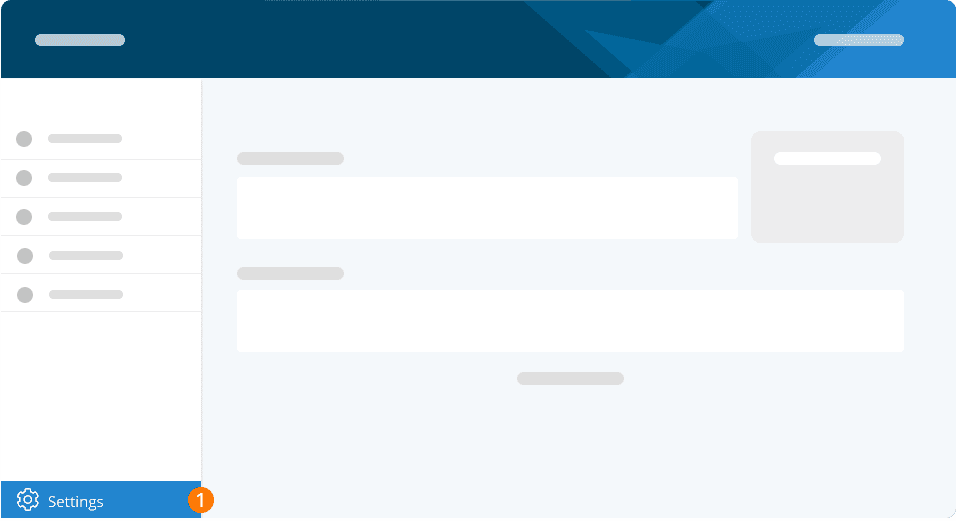
Step 1: Click on SETTINGS
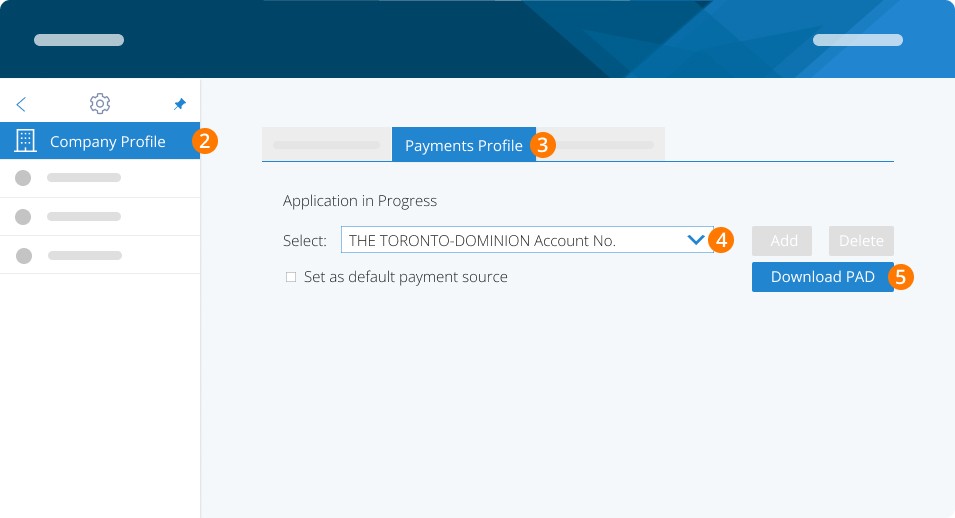
Step 2: Click COMPANY PROFILE
Step 3: Click PAYMENTS PROFILE
Step 4: Select the bank account you wish to modify
Step 5: Click on the DOWNLOAD PAD button
Once downloaded:
Step 6: Cross out the old MAX limit > write the new limit beside it.
Step 7: Update the signature and date at the bottom of the PAD and initial the change.
Step 8: Ensure the PAD is signed by the same individual(s) who signed the original PAD we have on file.
Step 9: Once completed, please send the updated PAD back to us via the Help Desk.
FAQ
1. What does this error mean?
It means the total amount for the pay run is higher than the maximum limit you have set in your pre-authorized debit (PAD) agreement.
2. Why did I run into this issue?
Either your payroll amount recently went up (for example, due to bonuses or more employees), or the maximum limit in your PAD agreement was set too low for your current payroll needs.
3. Can I still process the pay run if I receive this message?
You have a few options: Reduce the pay run amount, Increase the PAD agreement or process payroll using an alternative funding method.
4. How do I reduce the pay run amount?
You can remove certain items or split the pay into 2 pay runs covering the same dates.
5. What if this is my first pay run?
If it's your first pay run, some of the steps might not apply. In that case, check your email for a message titled "PaymentEvolution - ePay Requires More Information". That email will contain all of the steps required to complete your ePay pre-authorized debit set up.
6. How do I contact support for help with this?
You can contact support via phone or email
Email: support@paymentevolution.com
Phone: 647-776-7600 x2
Keywords: Max, Error Message, PAD, Pre-Authorized Debit, Payroll
396
Can't find what you are looking for? We can take a more direct look to help resolve your matter — Create Case or Contact Us