The audit log shows a history of changes in your master and client accounts. This includes:
Logins
Employee changes
Password changes
Added or changed bank details
User permission changes
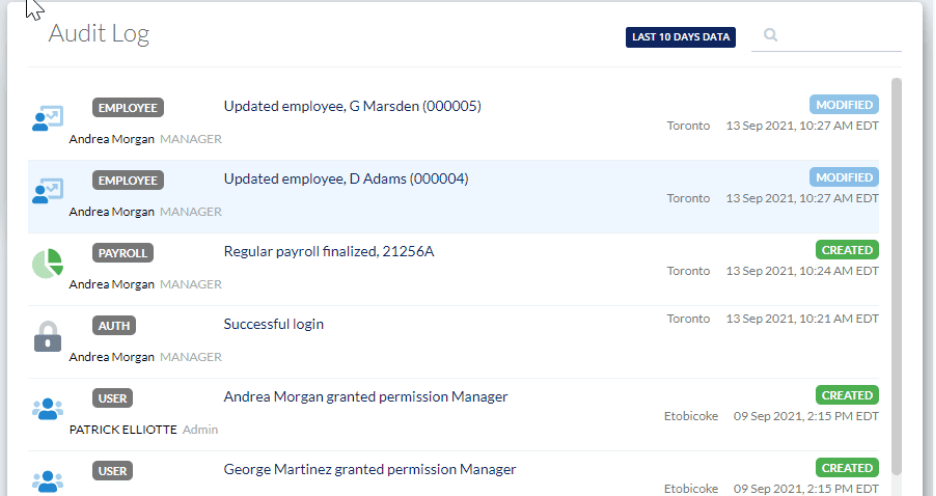
The card will show a list of most recent activities including the name of the user, and role from the last 10 days. The data shown always relates to the account you are viewing. For example, viewing the audit log from a client’s EVOLV dashboard will show you the audit trail for their account, whereas the audit log on your home dashboard will show you login information to the EVOLV account itself. So, to view a client’s audit log, you must open their EVOLV dashboard.
Viewing Older Events
Click on the full screen view to see activities for the past 2 months as well as the location where the user was when the action was performed.

Click to Sort, Filter or Search by date range from this view
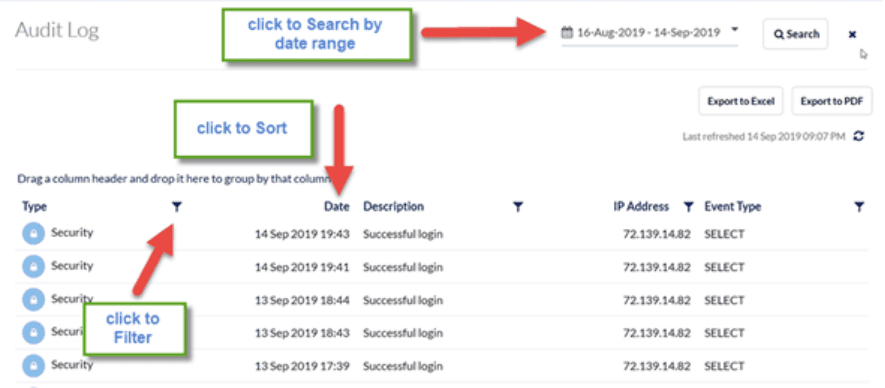
The data can be exported to PDF or excel.
Related Tasks
Keywords: EVOLV, Audit Trail
396
Can't find what you are looking for? We can take a more direct look to help resolve your matter — Create Case or Contact Us