Create a Support Ticket in EVOLV
To create a new support ticket for our Customer Success team
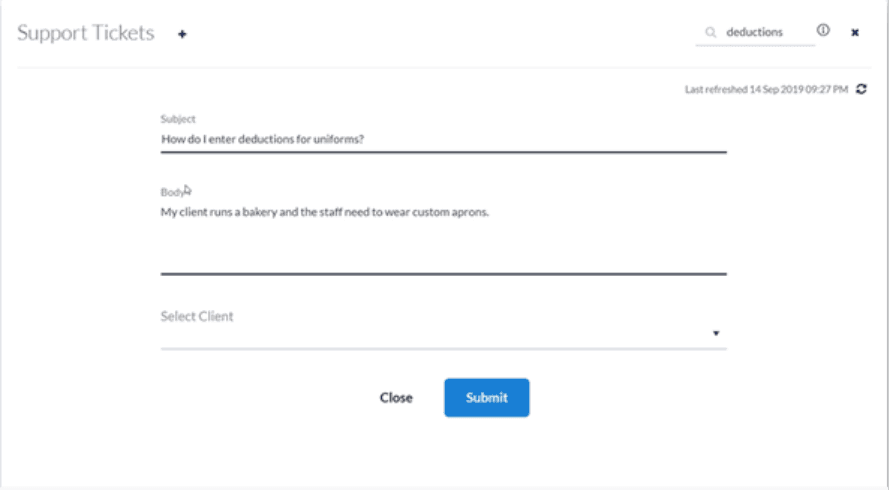
Step 1. Click the + icon in the Support Tickets tile

Step 2. Enter a Subject. This will be the subject line of the message our team receives.
Step 3. Type your question into the Body section. Include all the relevant details.
Step 4. Select the client to which your question pertains.
Reviewing your Support Tickets in EVOLV
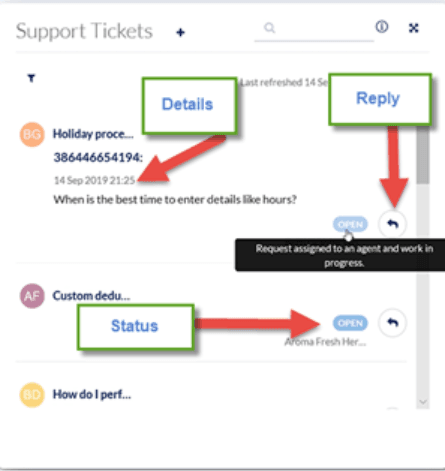
You can see the list of tickets you’ve submitted in the Support Tickets tile. You can click to see the details of a ticket, including the status and to reply to any messages from us.
Troubleshooting & FAQs
Can I make the EVOLV Support Ticket view full screen?
Yes, you can make it full screen by clicking the expand button in the top right of the tile.
Related Tasks
Keywords: EVOLV Support Cases, EVOLV Support Dashboard, Support Cases, Support Dashboard
396
Can't find what you are looking for? We can take a more direct look to help resolve your matter — Create Case or Contact Us