Payroll and Accounting Background
When recording payroll transactions and expenses in your accounting system, you should be aware of liabilities and expenses.
Expenses are typically considered items that you or your business have paid for. For example, if you've sent net wages to your employee, this would be considered an expense (you've already paid it out). Liabilities are items that are not currently paid, but will be paid at a future date. For example, the payroll source deductions (CPP, EI, Federal and Provincial tax,) are considered liabilities--you are collecting them on behalf of your employees and will be remitting them to the CRA/Revenu Québec at a later date. When the item is eventually paid, it becomes an expense.
Your PaymentEvolution account adheres to these principles and you'll see that payroll transactions have a liability and expense side. You should create these account codes in your accounting system to properly reflect your payroll transactions.
Payroll Standard Chart of Accounts
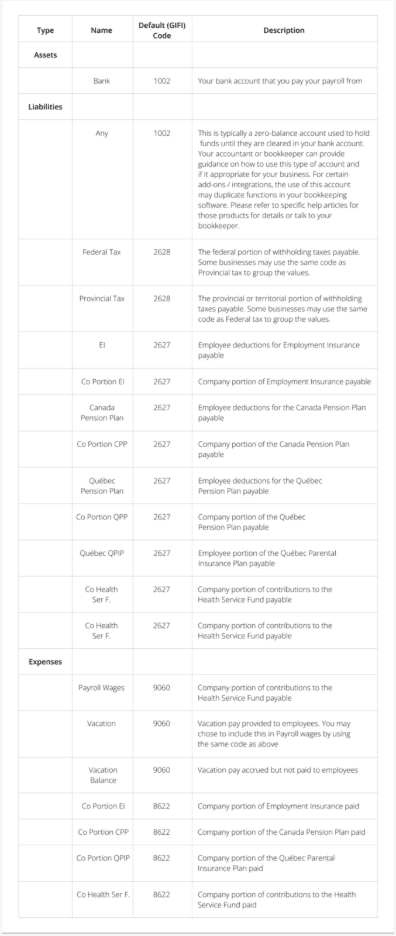
We adhere to the Canada Revenue Agency's guidance on account codes, the GIFI standard. The following descriptions will help you determine how to match Payroll's chart of accounts and general ledger codes to your bookkeeping system. You can update any of our codes to match your Chart of Account codes if necessary.
*Note: Please enter your own GL code for liability-Vacation Balance.
For each benefit and deduction you have for your company, you can create a GL code under Pay Rules to accurately report on your General Ledger Report.
Troubleshooting & FAQs
My GL reports aren’t being sent over to my accounting platform.
If you are having issues connecting to your accounting system, your connection might need to be re-established.
Start by logging in to your accounting platform. Then, try searching for PaymentEvolution in your Connected Apps. Enable the connection, and then logout of your accounting platform. Note – if this is not available, skip this step.
Login to PaymentEvolution, go to Settings > Add Ons and delete (trash can icon) the connection with your accounting platform.
Re-enable the add-on and follow the steps above to ensure your chart of accounts are mapped properly. Ensure ALL accounts are mapped, including those that you won’t use.
Check for special characters while mapping (dashes, accents, etc.) as this can disrupt the connection or prevent the report from being imported. If you need to remove the characters, do so from within your Chart of Accounts in your accounting platform.
Keywords: GL Codes, Chart of Accounts, Account Codes
396
Can't find what you are looking for? We can take a more direct look to help resolve your matter — Create Case or Contact Us