If you'd like to take advantage of enhanced features and services, you can upgrade your account plan at any time. Here's how:
Login to your payroll account.
Please note that you must use login credentials with Payroll Administrator credentials (the account you used when first registering for your payroll account would be an example of one)
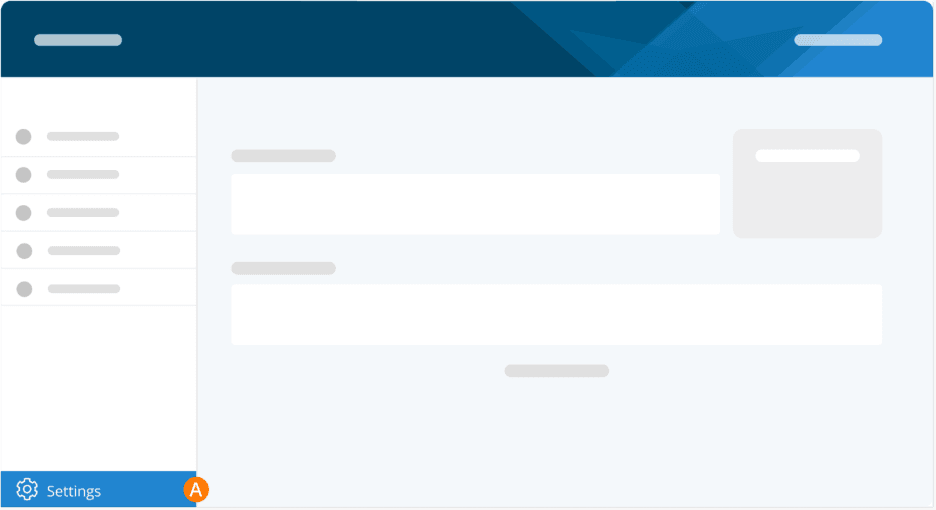
Step 1. Go to Settings.
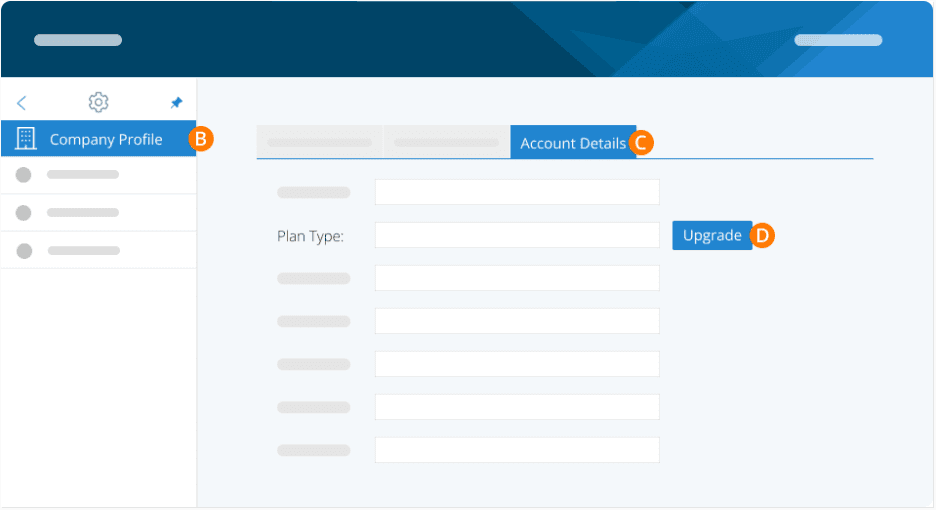
Step 2. Click Company Profile.
Step 3. Click Account Details tab.
Step 4. Click on the Upgrade button and choose the plan you wish to upgrade to. Fill out the payment details, and you have successfully upgraded!
Please Note
If you need to downgrade your plan, please contact our support team. We generally do not downgrade plans as removing paid features can affect reporting.
Instead, we suggest you collect all the information you need and open a new account. You will need to use a new email address.
If extenuating circumstances require you to keep same account, fees will apply for the downgrade.
Keywords: Upgrade, Change Plans, Business Plus, Upgrade Plan, Change Plan
396
Can't find what you are looking for? We can take a more direct look to help resolve your matter — Create Case or Contact Us