One of the advantages of using a cloud-based payroll service is sharing payroll responsibilities amongst your team. We’ve updated our multi-user access features to make it easier to share those responsibilities and delegate certain tasks (like recording the time your employees have worked).
Now when you create or modify an employee profile, you can set their permission level – granting them access to various aspects of the payroll service
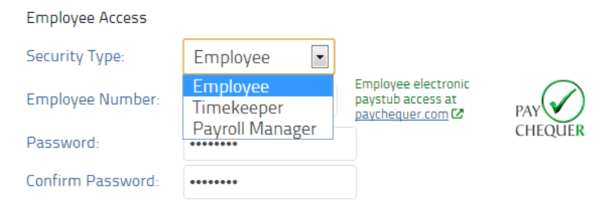
There are now a total of 4 permission types / roles available in the system. The primary permission type is “Payroll Master”. This role (not visible in the employee profile) is your master account and is the default account used when you first create your company profile. It has full capabilities in the system and is the account you want to use when making changes to your company profile or updating your pay rules. The other 3 permission levels are available for you to assign to your employees.
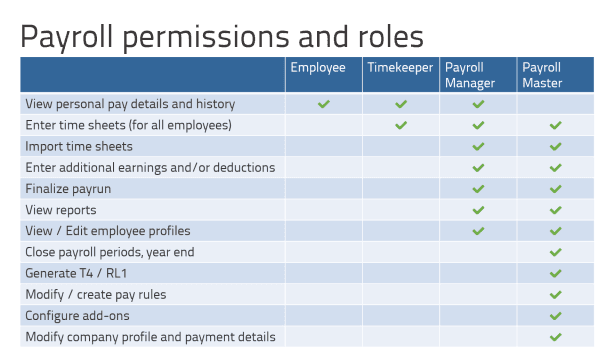
The ‘timekeeper’ role was added so you could have a manager or team lead enter time sheets for a group of employees. The ‘payroll manager’ typically completes pay runs and views reports. If you set an employee to have ’employee’ level access, they can only see their own pay history. To have staff access these additional features, they should login at https://secure.paymentevolution.com/employee . Here’s what a ‘payroll manager’ will see when they login:
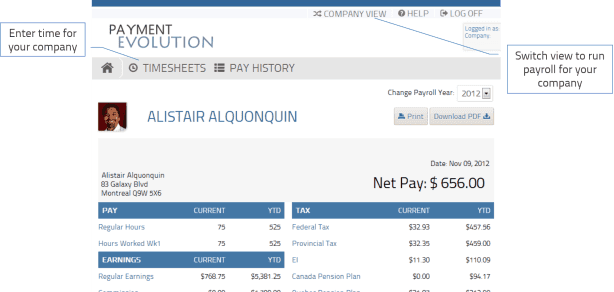
They can switch between their own personal view (to see their own pay stub) and the company view (to process payroll). The timesheets link can be used to quickly enter the time worked by members of your staff.
We’re continuously improving your payroll service and adding features like these. Some points to note:
Employees should continue using PayChequer.com to view their full pay history and tax documents.
Self-entry of timesheets is not available broadly yet (but we’re working on it!)
If you terminate an employee, they will no longer have access to payroll functions but can still view their own pay history at PayChequer.com
Roles are only assignable to employees you’ve profiled in the system (users outside your organization cannot be assigned roles at this time)
One of the advantages of using a cloud-based payroll service is sharing payroll responsibilities amongst your team. We’ve updated our multi-user access features to make it easier to share those responsibilities and delegate certain tasks (like recording the time your employees have worked).
Now when you create or modify an employee profile, you can set their permission level – granting them access to various aspects of the payroll service
There are now a total of 4 permission types / roles available in the system. The primary permission type is “Payroll Master”. This role (not visible in the employee profile) is your master account and is the default account used when you first create your company profile. It has full capabilities in the system and is the account you want to use when making changes to your company profile or updating your pay rules. The other 3 permission levels are available for you to assign to your employees.
The ‘timekeeper’ role was added so you could have a manager or team lead enter time sheets for a group of employees. The ‘payroll manager’ typically completes pay runs and views reports. If you set an employee to have ’employee’ level access, they can only see their own pay history. To have staff access these additional features, they should login at https://secure.paymentevolution.com/employee . Here’s what a ‘payroll manager’ will see when they login:
They can switch between their own personal view (to see their own pay stub) and the company view (to process payroll). The timesheets link can be used to quickly enter the time worked by members of your staff.
We’re continuously improving your payroll service and adding features like these. Some points to note:
Employees should continue using PayChequer.com to view their full pay history and tax documents.
Self-entry of timesheets is not available broadly yet (but we’re working on it!)
If you terminate an employee, they will no longer have access to payroll functions but can still view their own pay history at PayChequer.com
Roles are only assignable to employees you’ve profiled in the system (users outside your organization cannot be assigned roles at this time)
Get a 15-day free trial today,
no credit card required.
See why 20,000+ businesses trust PayEvo to handle their payroll, benefits management, and HR solutions every day.

No spam. Opt-out or cancel anytime.
Get a 15-day free trial today,
no credit card required.
See why 20,000+ businesses trust PayEvo to handle their payroll, benefits management, and HR solutions every day.
No spam. Opt-out or cancel anytime.